Use the Chipotle Nutrition Calculator to build a Chipotle-style meal ingredient by ingredient and watch the nutrition estimate change as you customize it. Choose a burrito, burrito bowl, salad, tacos, quesadilla, kids meal, or chips and sides, then adjust ingredients and supported portions while calories, protein, carbs, fat, and other available nutrition totals update.
Setup complete
MealBurritoGoalBalancedStarterOfficial starter
⚡
Building your bowl…
Loading ingredients and nutrition totals for your starter.
1
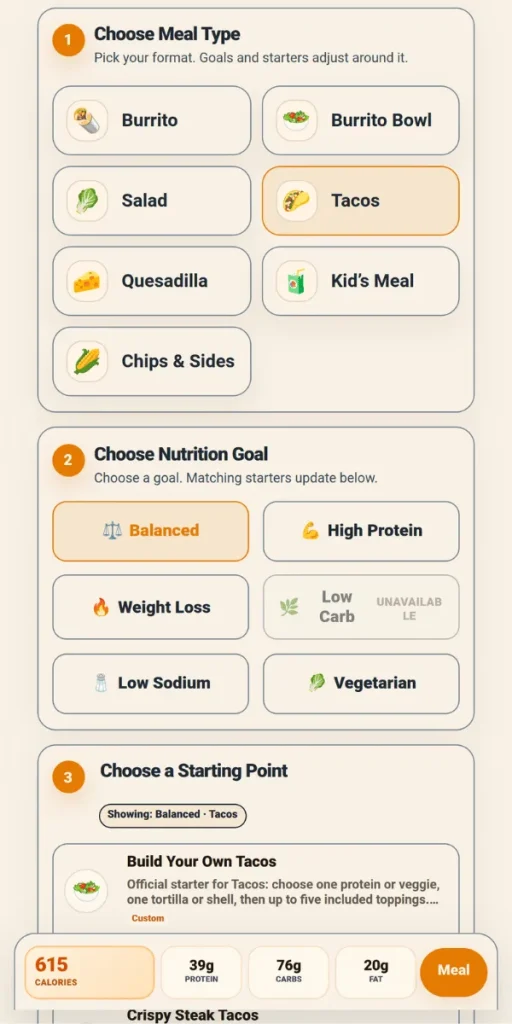
Choose Meal Type
Pick your format. Goals and starters adjust around it.
Building: Burrito
Next, choose a nutrition goal. Ingredient groups stay familiar while totals update live.
2
Choose Nutrition Goal
Choose a goal. Matching starters update below.
✅
Goal picked: Balanced
We’ll keep calories, protein, fiber, and sodium in view as you build.
3
Choose a Starting Point
Pick a base or suggested starter.
Showing: Balanced
CalProteinCarbsFatSodium
4
Customize Your Order
Meal: BurritoGoal: Balanced
Choose a section, then add or remove ingredients. Totals stay pinned below.
Ordering guidanceGuide
Sections adjust to the selected meal while totals stay flexible.
Taco Quantity
Choose whether nutrition is shown for one taco or a three-taco order.
Three Tacos
Three Tacos mode counts three taco tortillas/shells while fillings use the listed entrée serving for the full order.
Included with this starter
These items are included by default and already counted in your nutrition total.
Meal: BurritoSection: Included Ingredient / TortillaSections updating0 selected
Meal tools
IngredientServingCalProteinCarbsFatSodium
Baseline tortilla/shell-style items. Meal-specific defaults are introduced later.
IngredientServingCalProteinCarbsFatSodium
Common official group. Some meal types allow one selection here.
IngredientServingCalProteinCarbsFatSodium
Rice is shown separately from tortilla/base choices to better match official ordering groups.
IngredientServingCalProteinCarbsFatSodium
Bean choices and omission rows are official-ordering concepts; omission rows arrive in a later pass.
IngredientServingCalProteinCarbsFatSodium
Kid-size toppings use kid serving values. Kid’s Build Your Own allows up to two toppings.
IngredientServingCalProteinCarbsFatSodium
Official-style toppings and extras group. Exact caps are introduced in a later pass.
IngredientServingCalProteinCarbsFatSodium
Kid’s Meal included side choices allow one selection, including No Included Side.
IngredientServingCalProteinCarbsFatSodium
Served-on-the-side add-ons are kept separate from regular toppings and Single Sides when official rows use different nutrition values.
IngredientServingCalProteinCarbsFatSodium
Standalone side products. Chips & Sides behaves like an additive catalog.
IngredientServingCalProteinCarbsFatSodium
Side-size and served-on-side items are separated from standard toppings where possible.
IngredientServingCalProteinCarbsFatSodium
Standalone protein cup/add-on rows from the official High Protein Cups section.
IngredientServingCalProteinCarbsFatSodium
Drink choices are especially relevant to Kid’s Meal and add-on contexts.
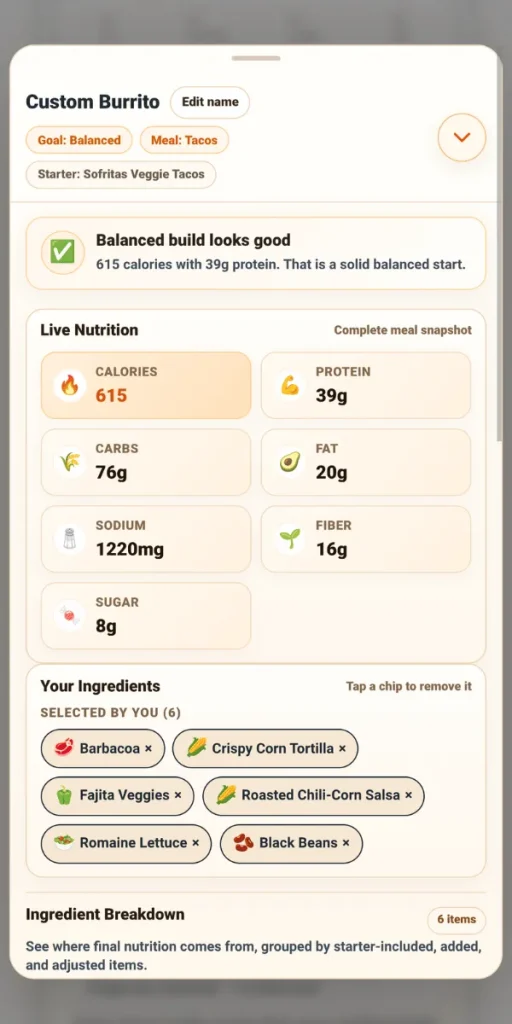
Custom Burrito
Goal: BalancedMeal: Burrito
✅
Ready to tune your meal
Pick a few ingredients to unlock goal checks and nutrition guidance.
Live NutritionComplete meal snapshot
🔥Calories0
💪Protein0g
🌾Carbs0g
🥑Fat0g
🧂Sodium0mg
🌱Fiber0g
🍬Sugar0g
Your IngredientsChoose a chip to remove it
✨ Start with a base, protein, or topping.
Ingredient Breakdown0 items
See where final nutrition comes from, grouped by starter-included, added, and adjusted items.
Load a starter or add ingredients to see per-item calories, macros, sodium, and source labels.
Changes from StarterChoose a starter
Read-only comparison showing what your selected starter includes, what you added, what changed, and the nutrition delta from the starter baseline.
Choose a starter to track included items, additions, portion changes, removals, and nutrition deltas.
Starter loaded. Customize it to see changes here.
Included by Starter
Added by You
Portion Changes
Removed from Starter
Nutrition Suggestions
Ranked goal-aware ideas from your current starter-aware build. Eligible suggestions can be applied through the same safe command layer used by the builder.
Build a meal
Add ingredients to generate goal-aware nutrition suggestions.
Swap ImpactSame-category preview
Preview ranked same-category swaps before applying one. Locked starter ingredients are protected, and each preview explains the calorie, protein, and sodium tradeoffs.
Add a removable ingredient to preview same-category swap impact.
Metric
Current
Swap
Change
Saved Builds
Save, restore, rename, duplicate, or delete starter-aware builds from this browser. Compatibility warnings are shown before restore.
0 saved
Build a meal to save it here.
No saved builds yet. Saved Builds stay in this browser and use the current starter-aware schema.
Order Receipt Preview
Read-only receipt view generated from the current order state. Optimized for the drawer on desktop, mobile, and browser print.
Build a meal
Choose a starter or add ingredients to generate a receipt preview.
Custom Meal ReceiptMeal · Goal · Starter
0CaloriesGoal: Balanced0gProtein0gCarbs0gFat
This independent tool can also work as a Chipotle calorie calculator, macro calculator, or Chipotle nutrition builder. Beyond the final total, you can see what is driving the nutrition, compare your customized meal with its starting point, preview ingredient swaps before applying them, and save meal ideas for later.
DATA & TRUST Nutrition data reviewed: September 2026 Coverage: 160 currently selectable nutrition records · 7 meal types · 6 nutrition goals Independent informational tool. Not operated by, sponsored by, endorsed by, or affiliated with Chipotle Mexican Grill, Inc. Nutrition totals are estimates, and actual restaurant portions may vary.
How to Use the Chipotle Nutrition Calculator
The calculator uses a guided flow so you can move from a meal idea to a detailed nutrition estimate without manually adding values.
Choose from the goals currently enabled for your selected meal type
Changes guidance and suggested starting points
3. Pick a starting point
Use a build-your-own option or an available suggested starter
Establishes the initial meal structure
4. Customize
Add, remove, or adjust ingredients and supported portions
Updates the nutrition estimate
5. Review meal
Open Meal Review and inspect the breakdown
Shows totals, changes, swaps, suggestions, and save/export options
GOOD TO KNOW Goal availability depends on meal type. The calculator only enables goals that are supported for the selected meal structure. A goal changes guidance, starter suggestions, and review messages; it does not change the nutrition values assigned to the ingredients.
The calculator also works as a guided Chipotle meal calculator: setup stays simple at first, then opens the full ingredient builder when you are ready to customize.
Calculate Calories, Macros, Carbs and Sodium
You do not need a separate tool for every nutrient. The same build can work as a Chipotle calorie counter, macro calculator, carb calculator, or sodium calculator depending on what you want to monitor.
The Chipotle Nutrition Calculator keeps calories, protein, carbs, and fat visible in the live nutrition dock while you build. Open Meal Review for a more detailed view. Where the underlying data is available, it can also show sodium, fiber, and sugar.
Nutrient
What you can review
Calories
Estimated calories in the current build
Protein
Protein contributed by selected ingredients
Carbohydrates
Total carbs in the meal
Fat
Total fat in the build
Sodium
Sodium where verified source data is available
Fiber
Fiber where source data is available
Sugar
Sugar where source data is available
If calories are your main focus, watch the total change as ingredients and portions are adjusted. If you are tracking macros, review protein, carbohydrates, and fat together. For carb- or sodium-aware planning, the relevant nutrition goal can make those choices more visible without changing the calculation method.
Choose the Meal Type You Want to Calculate
The calculator supports Burrito, Burrito Bowl, Salad, Tacos, Quesadilla, Kids Meal, and Chips & Sides, with meal-specific starters, ingredient boundaries, and rules. For deeper meal-specific guidance, use the Chipotle Bowl Calorie Calculator or Chipotle Burrito Nutrition page instead of repeating those topics here.
MEAL STRUCTURE MATTERS A meal type is more than a label. It controls what can be selected, which baseline ingredients are included, and how some meal-specific rules are applied.
Build Around Your Nutrition Goal
Nutrition goals shape the guidance around the meal you are actually building. Not every goal is available for every meal type. The selector updates after you choose the meal, and unavailable goals are intentionally disabled for that structure.
Current Meal-to-Goal Compatibility
Meal type
Available goals
Unavailable goals
Burrito
Balanced · High Protein · Low Sodium · Vegetarian
Weight Loss · Low Carb
Burrito Bowl
Balanced · High Protein · Weight Loss · Low Carb · Low Sodium · Vegetarian
—
Salad
Balanced · High Protein · Weight Loss · Low Carb · Low Sodium · Vegetarian
—
Tacos
Balanced · High Protein · Weight Loss · Low Sodium · Vegetarian
Low Carb
Quesadilla
Balanced · High Protein · Vegetarian
Weight Loss · Low Carb · Low Sodium
Kids Meal
Balanced · High Protein · Vegetarian
Weight Loss · Low Carb · Low Sodium
Chips & Sides
Balanced · Weight Loss · Vegetarian
High Protein · Low Carb · Low Sodium
WHY SOME GOALS ARE UNAVAILABLE Meal types have different required structures, locked baseline ingredients, and supported goal logic. The calculator does not force a goal onto a meal type when that goal is not supported. An unavailable goal on one meal can still be available on another.
Balanced General-purpose guidance for a more balanced build.
High Protein Keeps protein and higher-protein choices more visible.
Weight Loss Keeps calorie awareness more prominent.
Low Carb Highlights carb-heavy choices such as tortillas, rice, beans, sugary drinks, and some sides.
Low Sodium Draws attention to sodium-heavy selections and possible alternatives.
Vegetarian Keeps guidance focused on vegetarian-friendly choices.
A goal is a planning aid, not a rule. When a goal is enabled for the selected meal, you can ignore a suggestion or keep building manually. The goal affects recommendations and messages, not the nutrition math.
See What Is Changing Your Nutrition Total
A final calorie or macro number tells you where the meal ended up. The review tools help explain how it got there.
Review feature
What it helps explain
Ingredient Breakdown
Which starter-included or added ingredients contribute to the total
Changes from Starter
What changed from the selected starting point
Swap Impact
How a replacement would affect available nutrients before you apply it
Nutrition Suggestions
Goal-aware ideas based on the meal currently being built
Meal Review
A detailed summary of ingredients, portions, and nutrition
Instead of only asking “How many calories are in this meal?”, you can see which choices caused the change and compare alternatives in context.
Compare Ingredient Swaps Before Changing Your Order
Sometimes the more useful question is not “What does this ingredient contain?” but “What changes if I replace it?”
Within the Chipotle Nutrition Calculator, Swap Impact lets you preview a replacement before applying it. The comparison can show the current ingredient, an alternative from a similar category, and the difference in calories, protein, carbs, fat, and sodium where those values are available. It can also explain why the swap may be useful for the goal you selected.
If the alternative fits your meal better, apply the swap and continue building. Eligible recent changes may also offer an undo option. This lets you compare choices in the context of your actual meal instead of reading two nutrition rows separately.
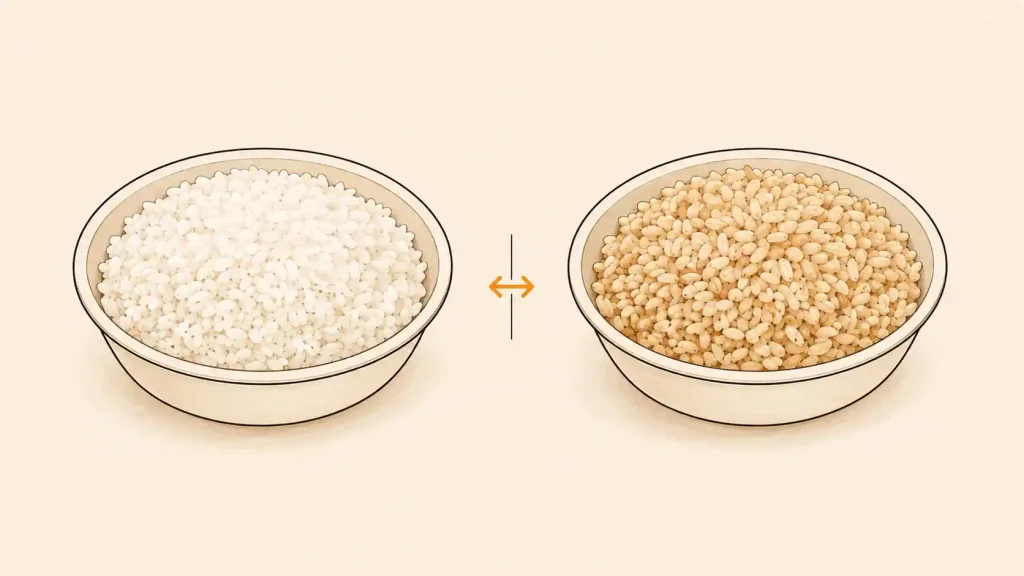
Example: White Rice vs Brown Rice
Per 4 oz serving
White Rice
Brown Rice
Difference with Brown Rice
Calories
210
210
0
Protein
4 g
4 g
0 g
Carbs
40 g
36 g
-4 g
Fat
4 g
6 g
+2 g
Sodium
350 mg
190 mg
-160 mg
Fiber
1 g
2 g
+1 g
INTERPRETATION The calorie total is identical, but the nutrient profile is not. A swap can change carbs, fat, sodium, fiber, or other nutrients even when calories stay the same.
What the Current Nutrition Dataset Shows
The calculator becomes more useful when the underlying values are analyzed rather than simply listed.
Burrito vs Bowl: What Changes Before Fillings?
The standard Burrito starting point includes a flour tortilla. The Burrito Bowl starts without a locked tortilla baseline. This table isolates that structural difference before any fillings are added.
Starting-point difference
Burrito
Burrito Bowl
Flour tortilla included
Yes
No
Tortilla calories
320
0
Tortilla carbs
50 g
0 g
Tortilla fat
9 g
0 g
Tortilla protein
8 g
0 g
Tortilla sodium
600 mg
0 mg
INTERPRETATION A bowl is not automatically a low-calorie meal. This comparison isolates only the tortilla baseline. The final total still depends on every ingredient and portion you add.
Chicken vs Steak
Per 4 oz serving
Chicken
Steak
Calories
180
150
Protein
32 g
21 g
Carbs
0 g
1 g
Fat
7 g
6 g
Sodium
310 mg
330 mg
Protein per 100 calories
17.8 g
14.0 g
Steak has fewer calories per listed serving, while Chicken provides more protein and more protein per 100 calories in the current dataset. That does not make one protein universally better; it shows why the useful choice depends on what you are prioritizing.
Get Suggestions Based on Your Current Meal
Nutrition Suggestions consider the selected goal, meal type, current ingredients, available alternatives, and nutrition totals.
A High Protein build may surface a protein-rich option, while a Low Sodium build may draw attention to a sodium-heavy choice. Vegetarian guidance stays within vegetarian-friendly directions, and Balanced guidance can help keep the meal closer to a general balanced range.
Some suggestions are informational; others can be applied directly when the current meal supports the change. They are designed to help you explore options, not prescribe a diet.
Save, Print or Export Your Build
You can keep useful meal ideas without creating an account.
Feature
What it does
Save locally
Restore a build later in the same browser/device
Duplicate
Copy a meal before testing another version
Rename
Keep saved meal ideas organized
Print
Open a receipt-style nutrition summary in the browser print flow
Export PNG
Save a shareable image version where supported
Saved Builds are stored locally in the current browser/device and do not automatically sync across devices.
DATA SOURCE Foundation: March 2025 U.S. Nutrition Facts publication Menu review: August 2026 nutrition review + September 2026 current-menu sync Dataset: Independent, locally maintained nutrition dataset Calculation: Selected ingredients + applicable meal and portion rules Important: This is not a live restaurant data feed.
The Chipotle Nutrition Calculator uses a bundled nutrition dataset based on official Chipotle nutrition sources, including the March 2025 Nutrition Facts PDF and an August 2026 review of official menu nutrition information.
Data snapshot: 160 currently selectable nutrition records · 163 total tracked records · 7 meal types · 6 nutrition goals · Current-menu status last verified September 2026
Current-menu status: The September 2026 sync includes 143 standard active records and 17 limited-time active records. Current limited-time families include Pollo Asado, Chili Lime Chips, and Cilantro Lime Sauce variants. Three Honey Chicken records are retained for historical provenance and are excluded from current selections.
The dataset is stored locally for the calculator rather than pulled from a live restaurant feed. The calculator is independent and does not claim to be live-synced with Chipotle.
How Totals Are Calculated
Nutrition totals are estimated from the ingredients you select, the nutrition fields available for those ingredients, and the calculator’s portion rules. Supported Light, Extra, or Double portions use the calculator’s current multiplier behavior. Some meals also have structure-specific rules; taco quantity, for example, affects how shells or tortillas are counted.
Why the Result Is an Estimate
ABOUT PORTION ESTIMATES Published serving values are useful reference points, but restaurant scoops can vary. Light, Extra, and Double portions are calculator estimates based on portion rules, not measurements of a specific restaurant serving.
A restaurant order can differ. Serving amounts, preparation, ingredient availability, and future menu changes can all affect the food you actually receive. Light, Extra, and Double portions are also estimates based on the calculator’s portion rules rather than a measurement of a specific restaurant scoop.
Use the calculator for meal planning, comparison, and understanding ingredient choices. For strict dietary needs, allergies, medical conditions, or final nutrition decisions, check the restaurant’s current official nutrition and allergen information directly.
Maintained by Muhammad Kamran Latif, Founder & Data Editor. Official-source nutrition data · independently verifiable · unavailable values are not guessed. Build version: 1.1.292-accessibility-ux-300
View source, update history & how calculations work
Source basis
Official Chipotle nutrition sources, March 2025 PDF + August 2026 calculator rows + September 2026 current-menu sync. Ingredient values are taken from first-party Chipotle sources where available, with source dates and provenance retained for verification. Derived values are identified as derived, and unsupported fields remain unavailable.
Current menu coverage: 160 selectable records (143 standard active + 17 limited-time active). 3 historical LTO records are retained for source traceability but excluded from current menu surfaces.
How calculations work
Normal uses the listed serving value.
Extra / Double uses 2x the listed serving value.
Light uses half of the listed serving value.
Totals are recalculated from selected ingredients and rounded for readability.
Trust and accountability
Data and editorial maintenance is accountable to Muhammad Kamran Latif, Founder & Data Editor.
Unavailable nutrient fields remain explicit and display as unavailable rather than being treated as zero.
Source conflicts and derived values are documented rather than hidden or silently replaced with third-party guesses.
Chipotle Nutrition Calculator is an independent nutrition tool and is not affiliated with, sponsored by, or endorsed by Chipotle. Nutrition values are sourced from official Chipotle nutrition and menu materials wherever available. Missing values are not fabricated; unavailable fields remain unavailable. Actual restaurant values may vary with portion size, preparation, ingredient changes, and location.
Is this the official Chipotle Nutrition Calculator?
No. This is an independent calculator for informational use. It is not operated by, sponsored by, or endorsed by Chipotle.
Can I use it as a Chipotle calorie calculator?
Yes. Calories update as you customize your meal, and the same build can also show protein, carbs, fat, sodium, fiber, and sugar where data is available.
Does the calculator show Chipotle macros?
Yes. You can review protein, carbohydrates, and fat for the meal you build, so the tool can also be used as a Chipotle macro calculator or macro counter.
Can I calculate a Chipotle bowl or burrito?
Yes. Choose the meal type first, then select one of the nutrition goals enabled for that meal and choose a starting point before customizing the available ingredients. The same calculator also supports salads, tacos, quesadillas, kids meals, and chips and sides.
Can I track carbs or sodium?
Yes, where those values are available in the bundled data. Low Carb or Low Sodium guidance can also be more prominent when that goal is enabled for the selected meal type.
Can I calculate Light, Extra, or Double portions?
Some ingredients support portion adjustments such as Normal, Light, Extra, or Double. Not every ingredient supports every option, and the resulting totals are estimates based on the calculator’s portion rules.
Can I save my meal?
Yes. Saved Builds are stored locally in the current browser/device. You can restore, duplicate, rename, or delete saved meal ideas, but they do not automatically sync to another device.
How accurate are the nutrition estimates?
The calculator estimates nutrition using bundled ingredient data based on official Chipotle nutrition sources and applies its meal and portion rules consistently. Actual restaurant totals can still differ because serving sizes, preparation, ingredient availability, and menu information can change.